
Management of properties can be terminated for several reasons:
Lease expired and landlord not reletting
Transfer to another agent
Renovations to be done
Property being sold
Notice periods for termination
If an owner wishes to terminate management during the term of a tenancy, they are required to provide 60 days' notice. If they choose to terminate immediately, they will need to pay management fees for that 60 day period. The fees include any fee we would be entitled to receive during that 60 day period. For example, management fees, admin fees, if a routine fee is scheduled, a renewal fee or letting fee. (Please check with Training or Business Manager for fee calculation).
These fees should be automatically deducted from the rental funds held for the owner or if no funds, the owner requested to transfer funds prior to keys and documents being handed over.
It is important that a process is followed so our data is kept clean and correct for statistics and reporting purposes, everything is finalised/archived in our systems by the time keys are handed back to the landlord.
Step 1: Create a Trello card
Step 2: Recording in Property Tree
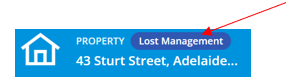
The property is to be labelled as a “lost management” in Property Tree
Search the property – it will automatically default to the property profile
Click on the "Details" tab
Under Property Management Information, click on the edit pencil
Enter the “authority end date” and tick the box next to "lost"
A new field will pop up – Lost Reason. Select the reason from the drop-down menu and click on "Save"
The property profile will then be labelled as a “Lost Management”
Step 3: Set vacate date against the tenant
Search the property
Click on the tenant profile
Click on tab "Lease & Rent"
Scroll down to “Vacate Information” – click on the edit pencil to the right-hand side of the screen
Select “vacate” and enter date the owner gave notice not to renew the lease
Enter the date the tenant is vacating or the property is to be handed over to the new agent/landlord
Charge to date will be the same date
Description – lost management
Step 4: Photocopy keys ready for collection
This should be done 1-2 days prior to collection. Email Reception to get the keys ready. All keys on the office set are to be removed from the key ring and laid flat on the transparency template (Key Receipt – Magain City Realty to Agent/Landlord) and photocopied. If the tenant has moved out, ensure the tenant and office set of keys are photocopied. Make sure not to hand over the CR key tag.
Step 5: Remove the property from Smoke Alarms Australia system
Before proceeding, make sure there is no active job in Bricks and Agent
Log onto SATS Agency.sats.com.au
Search the property address
Click on the address (blue link)
If there is a tenant in the property, delete their details by clicking on the bin to the right hand side of the screen.
Click on "No longer manage"
Check Property Tree and enter the last date of management and the reason management is lost. If unsure, just select other.
Click on "Proceed" and then “Yes”
Step 6: Remove admin fees
These fees are removed to ensure that they do not continue to accumulate against the owner while no transactions are taking place.
Click on owner profile
Click on "Financials" tab
Scroll down to “Fees”
Click on "View Fees"
Click on x to delete the admin fee

Step 7: Archive tenant, property & owner
The steps to archiving each of these is the same except you will need to select the tenant, property or owner profile. Archiving should be done in the order of tenant, property, owner.
Search the property
Click on the profile you are archiving
Click on 3 dots
Click on “archive”
A list of archiving requirements is previewed to enable you to double check everything has been cleared. In the text box at the bottom, type any notes you feel are relevant.
Click on "Save"
Step 8: Tenancy Application and One Drive
Delete the tenancy application. Save the Trello Checklist to the property folder in One Drive. Then move the property folder to the Lost Managements folder.
Management to be transferred
Step 1: Tenancy documents will need to be prepared for emailing to the new agent/landlord on the day management changes.
They will require :
tenancy agreement and subsequent lease renewals
tenant's contact details
ingoing inspection report and last routine inspection report
tenant key receipt
outstanding tenant invoices
outstanding invoices for the owner
rent ledger
change of ownership form
Photocopy of keys to be handed over to landlord/new agent
Step 2: Print the rent ledger
Click on the tenant profile
Click on the 3 dots to the right-hand side of the tenant’s name
Scroll down to “print ledger”
Click on “Complete History of One Tenancy”

Scroll down and click on "View Report" > Print
Step 3: Prepare a Change of Ownership form
Enter the property address, bond number, tenant/s name & contact details, Magain City Realty's address and sign.