
Once an appraisal has been done and the owner wishes to proceed, a management agreement is to be completed. If you have been speaking with the client over the phone, send the client a questionnaire so you can complete as much information on the management agreement as possible before sending it to the owner to sign.
The management agreement template can be found in REIForms Live.
Log in details can be found in HelpCentre under Passwords & Logins
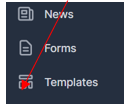
Step 1: Click on templates on the left-hand side panel
Step 2; Search for “CR Magain - Management Agreement” and click on 'Create Form'
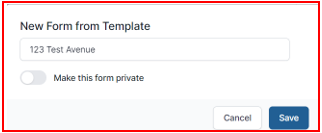
Form name – use property address (e.g. 123 Test Avenue - Management Agreement) & click “Save”
Step 3: A "draft" document will create. The form itself is relatively self-explanatory as to the information to be entered but there are a few areas to be aware of. Please see below sections to complete.
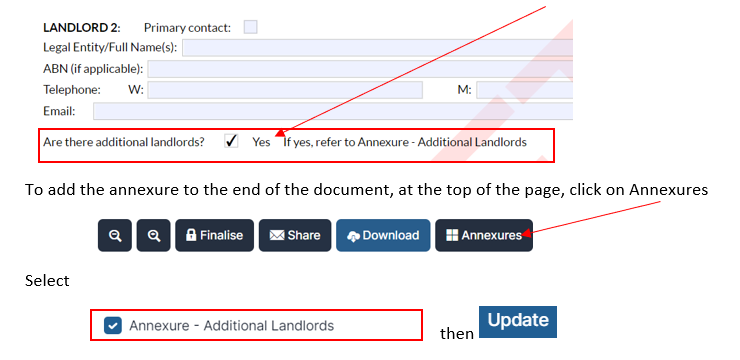
Section 1: Adding Additional Owners Names - if there are more than 2 owners, an Annexure to the agreement will need to be created.
Section 2: Agent Details - do not alter
Section 3: Premises
The full property address is to be entered. Also check which council covers the suburb.
If the property is strata or a community corporation, the corporation details need to be entered. If the landlord is unable to provide them at the time, enter TBA.
Section 4: Minimum Housing Standards
This must be ticked yes to comply with the Residential Tenancies Act.
Section 5: Embedded Electricity Network
The landlord must provide details if the property is to be connected on an embedded network.
Section 6: Type of Agency
Do not change. A sole agency means that only Magain City Realty are authorised to act
Section 7: Term of management agreement
This is usually a minimum of 12 months but can be more if preferred. However, it is important to remember that a longer term may tie you into a very difficult client.
Section 8: Rental
As discussed with the owner after the rental appraisal has been done. If the owner is seeking to try a different amount, be sure to enter the range as instructed by them.
Section 9: Initial Marketing Period
This is the period the agency has been given for advertising and letting the property. This period is protection for both parties. It is generally 6 weeks.
(a) If it isn't let during this time, the landlord can terminate the agreement
(b) If the landlord is proving to be a difficult client and not prepared to work with you in letting their property, the agent can terminate management.
Section 10: Professional fees
These must be outlined clearly on the management agreement and discussed in full with the landlord prior to signing the agreement. All fees are GST inclusive. If the landlord wishes to negotiate on any fees, this must be approved by the Business Manager.
Section 11: Expenses
There are standard fees entered for Internet and Other ($99 fee)
Section 12: Outgoings
Tick any outgoings that the landlord wants us to pay. Magain City Realty will then contact the service providers and arrange for the invoices to be directed to us. The account numbers must be provided for us to be able to do this. Or a copy of the last invoices is handy to get.
Section 13: Maintenance
The landlord can provide Magain City Realty with an expense limit for maintenance which can be used without approval.
Section 14: Discloure
If Magain City Realty receive any benefit from a third party for referral of business, this must be disclosed to the landlord.
Section 15: Charges to tenant
The landlord is entitled to seek reimbursement of water costs (usage & supply) from the tenant. The management agreement is defaulted to all water usage and water supply charges but the landlord can amend if they wish to.
Section 16: Payment to Landlord
All payments are via bank transfer only and can be made monthly or mid month and end of month.
Section 17: Insurance
It is the landlord's responsibility to effect and maintain building/strata insurance, landlord insurance, contents insurance and public liability.
Section 18: Exclusions of part of property
The landlord is able to exclude any part of the property they may wish to retain for their own purposes e.g. garage, exterior room or an appliance that does not work. If the landlord does not exclude the fixture or the area, the tenant is legally entitled to use or repair/replacement of the appliance.
Step 4: Review your document: - the agreement must be signed by all parties (owners & agents) listed on the agreement. Make sure all information has been entered and it is correct. Once the document is signed, all terms and conditions are binding.
Happy with the document? Click on "Finalise" to remove the "Draft" watermark and then click " Finalise" again.

Step 5: Send to the owner for signing: The "Forms Live Sign" option will open on the right hand side of your screen for you to click on.
Step 6: Change the Landlord/Agent to 'Select Agent (Optional) then enter in the Property Managers details. Check owner details correct. Scroll to the bottom and click Next.
Step 7: Set the signing order as the Landlord/Agent for Group 1, and the owner/s for Group 2 using the up and down arrows.
Step 8: Custom Message - Subject should say- 'Sign Request - Management Agreement for Property Address'. Message should say
Hi,
Please find included in this email a link to follow in order to execute your Management Agreement for our Property Management Services.
Once all parties have signed the documents a final executed copy will be immediately delivered via email to all parties.
If you have any queries about this process, please contact me.
Kind Regards,
Property Manager