
Link to Consumer & Business Services fact sheet: SA.GOV.AU - Assigning a lease (www.sa.gov.au)
Lease assignments are covered under Section 74 of the Residential Tenancies Act of South Australia 1995.
In summary, this section states:
A tenant may not assign their interest in the agreement or sublet the premises without the written consent of the landlord.
The landlord must not unreasonably withhold consent.
It is also important to remember the tenant cannot be charged for a lease assignment unless provision has been made in the landlord’s management agreement that a fee is payable. In this case, the landlord would be charged and the tenant required to reimburse them for the fee.
Where a property is occupied by a single tenant who wishes to assign the lease, it is Magain City Realty's policy to refuse assignment of the lease and have the tenant enter into a lease break.
Why?
It is in the landlord’s best interest to ensure:
the outgoing tenant has paid rent up to their last date of tenancy
the outgoing tenant has paid all water charges applicable up to their last date of tenancy
the outgoing tenant has left the property clean and undamaged. If the property is furnished, all inventory items are present and nothing additional has been left behind.
all keys are returned & checked
a new tenant enters into a new agreement, therefore having full understanding of the terms and conditions of the tenancy upfront.
IMPORTANT:
Do not make any changes to Property Tree or Bonds Online until the lease addendum is signed by all parties.
Change of a Tenant or Adding Another Occupant
Once you are aware of any changes occupants of a tenancy, create a Trello card.
Follow the process as per the Trello Card - Lease Assignment
Notice to vacate
Any tenant wishing to vacate a property must give written notice of their intention and this should be done prior to any new occupant moving into a property. It is also policy to contact the remaining tenants to make sure they know what is happening and they confirm approval to proceed.
Application submission
An application from the intended occupant must be completed.
Add the property into 2Apply and provide the tenant with the link so they can complete their application online. Providing the tenant with a code 9966 prevents other persons accessing the property to apply.
Also, be mindful if it is an NRAS property – the income for all remaining tenants and the incoming tenant, needs to be tested.
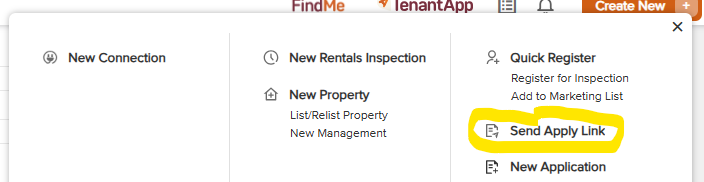
Log into IRE and click on the orange box in the top right corner called 'Create New'. Then click on 'Send Apply Link'.
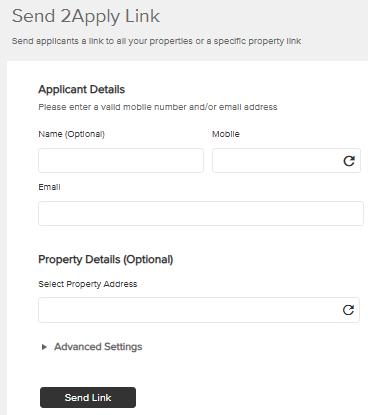
Enter the applicants name, number and email and the property address then click send link.
Application processed and referred to the landlord
Any changes to a tenancy must be referred to the landlord for approval. Once it has been discussed with the landlord and approval given, confirm with the landlord, via email, on the changes being made.
Approval given /not given by the landlord
Remember, the landlord cannot unreasonably withhold consent without good reason. Call the applicant and advise them that their application has been approved / declined. If approved, follow this up with a confirmation email which will outline the next steps to be taken.
Managing the Bond
BEST PRACTICE – Residential Bonds Online v Change of Tenant Form
It can be difficult trying to navigate a tenant change on the RBO website as it relies on:
requesting removal of the tenant’s interest in the bond and relying on the tenant to authorize removal of their name as an interested party.
If a tenant fails to approve removal of their interest in the bond, their name will remain as an interested party and may still have a claim against it for refund. By having all parties sign a Change of Tenant form, the information can be updated manually by Consumer & Business Services.
It is therefore easier to have all parties sign the “Change of Tenant” form and submit this to Consumer & Business Services to update at their end. Make sure to include a copy of all their photo id with signatures.
Is the applicant to be added to the bond?
Generally, SACAT would expect any persons listed as a tenant for a property to have an interest in the bond. However, this is not necessary.
Check with the tenants/applicant if this is what is required. The new tenant can then be added to the bond lodgment via bonds online or by signing a change of tenant form.
Cash bonds
It is up to the outgoing tenant to have the incoming tenant pay them out for their share of the bond. Partial bond refunds cannot be done.
It is the responsibility of the ingoing & outgoing tenant to check the condition of the property before money is transferred between tenants (particularly any area the incoming tenant will be solely responsible for e.g. the bedroom) to make sure there is no damage which may be claimed by the landlord later. If there are any damages, it will need to be sorted between the tenants. If they fail to do this, it is not up to Magain City Realty to follow this up.
Housing SA bonds
A bond guarantee provided by Housing SA cannot be transferred as it is a government issued bond registered against a specific person.
This means, the incoming tenant would need to lodge a bond for their share, whether they choose a cash bond or another Housing SA guarantee. This should be submitted to Magain City Realty before the addendum is signed to make sure the bond is in place.
Only when the additional bond guarantee form or cash is received by Magain City Realty for the incoming tenant, should the bond for the outgoing tenant be released.
Addendum to the Tenancy Agreement
Any change to a tenancy agreement must be in writing and best practice is for this to be done via an addendum to the tenancy agreement.
The addendum can be prepared in REI Forms using the Lease Assignment template and should contain:
The name of all current tenants
Who is vacating & who is the tenancy being assigned to
The date the change becomes effective
All tenants must sign the addendum including the outgoing tenant.
Completion and Data Update
Adding a tenant to a bond
The tenant will receive an email to advise that this request has been made. They will have 7 days to log into the website and approve removal of their name.
Copy of ingoing inspection report & tenancy agreement
Make sure a copy of the ingoing inspection report and tenancy agreement are sent to the new tenant.
Update Property Tree
Once the addendum (& change of tenant form if used) has been signed by all parties, update Property Tree. Remove the outgoing tenant’s name and create a new tenant
Log onto property tree: propertytree.com
Step 1: Search the property / tenant and confirm you have the correct tenant
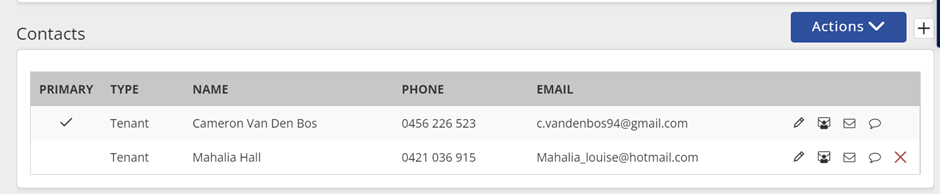
Step 2: Scroll down to "Contacts". Provided the tenant you are removing is not listed as the primary contact, click on (X) Make sure a note in put under the tenant notes the name of the outgoing tenant and the date the change was effected.
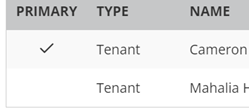
Step 3: Add the new tenant details by clicking on the + sign in the contacts field
Step 4: Complete the contact information following the screen prompts (NB: a title is not needed)
Address: Should prefill to the property address so nothing to change
Tick the “mailing address as above”
Click on + to enter mobile number & email address
Preferred contact method - tick "email receipts", "email invoices" "do not contact tenant for marketing...................
Contact type: Tenant
Step 5: Save