Use of the credit card is required to purchase items for the office when needed.
It is an AMEX so may not be accepted through all suppliers/retailers, if this is the case, please let Geoff know. The credit card is kept with Geoff.
The credit card must be logged out (using the same method as a key checkout)
Key Number to log out credit card is 1c
With SACAT applications you will need to select the pay by invoice option and then add the invoice to PT to be processed. If the property is vacant the owner will need to transfer us funds first.
Office Supplies
Step 1: Scan the receipt to yourself.
Step 2: Log into the “Credit Card Authorisation Form” and complete it, making sure you attach the receipt into the document.
https://forms.office.com/r/NPNfSmXXaY
Step 3:
Place original receipt in snap lock bag located in top drawer at reception.
Purchases for owners
Step 1: Download or scan confirmation details of purchase order
Step 2: Log into the "Credit Card Authorisation Form: and complete it, making sure you attach a copy of the purchase confirmation.
https://forms.office.com/r/NPNfSmXXaY
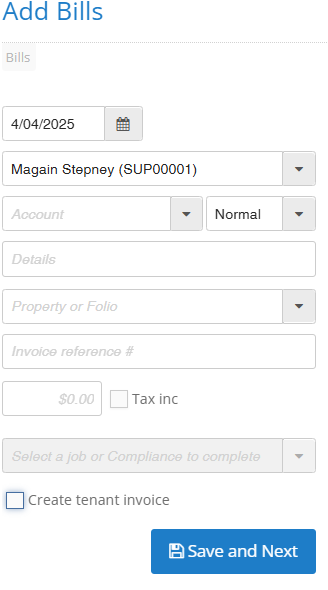
Step 3: Create a bill against the owner in Property Me, payable to Magain Stepney.
In Property Me to go the side tab called Accounts > Bills > Add Bill.
Enter in Magain Stepney as the creditor and enter the property address. If the cost is also to be charged to the tenant, then select the 'Create Tenancy Invoice' section too.
Enter the invoice details and attach a copy of the purchase receipt. Then click Save and Next. You'll then see the invoice pending on the ownership profile.